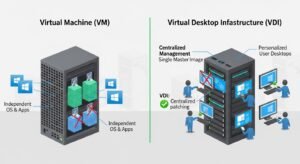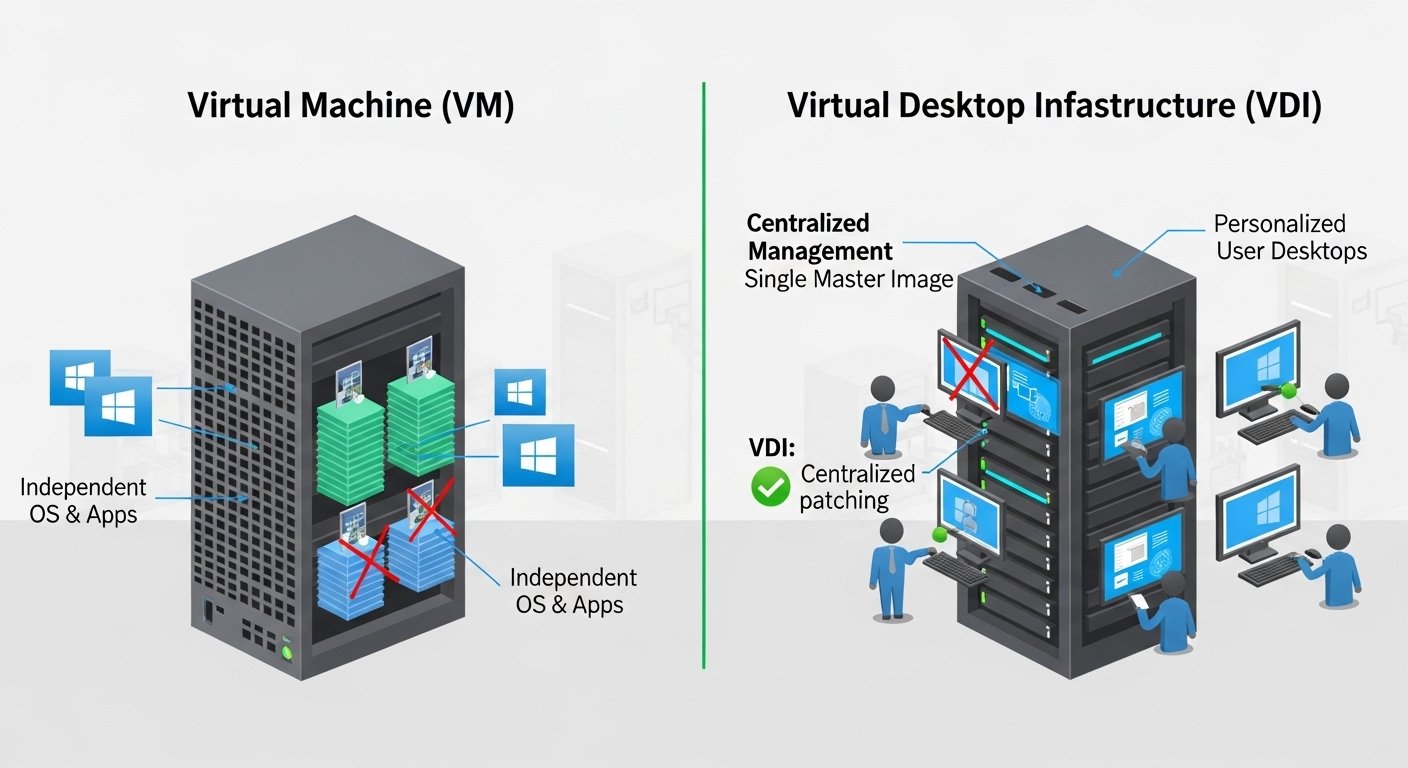
Imagine a company where employees need to work on computers from different locations. Instead of giving every employee a physical computer, the company creates digital computers that run on powerful servers. Some employees use virtual machines (VMs) that run as independent computers within another system. Others use virtual desktop infrastructure (VDI), which allows them to access a complete desktop environment from anywhere through the internet.
This situation clearly shows the difference between VM and VDI in real-world technology. A VM is a virtual computer that runs its own operating system and applications, while VDI delivers a centralized desktop experience to users from a remote server. Understanding the difference between VM and VDI is important for students, IT professionals, and businesses. The difference between VM and VDI helps organizations choose the right technology for remote work, security, and resource management in modern digital environments.
Key Difference Between the Two
The main difference between VM and VDI is that a virtual machine is a single virtual computer running on a host system, while VDI is a system that delivers virtual desktops to multiple users from centralized servers.
Why Is Their Difference Necessary to Know for Learners and Experts?
Understanding the difference between VM and VDI is essential in the field of information technology and cloud computing. These technologies are widely used in modern businesses, schools, and data centers.
For learners, knowing this difference helps them understand virtualization concepts used in modern computing systems. For IT professionals, it helps them design efficient networks, manage resources, and improve security. In society, technologies like VDI and VMs support remote work, online education, and secure data management. Therefore, understanding the difference between VM and VDI helps organizations and individuals adopt better technological solutions.
Pronunciation of the Keywords
VM (Virtual Machine)
- US: /ˈvɜːr.tʃu.əl məˈʃiːn/
- UK: /ˈvɜː.tʃu.əl məˈʃiːn/
VDI (Virtual Desktop Infrastructure)
- US: /ˈvɜːr.tʃu.əl ˈdesk.tɑːp ˈɪn.frə.strʌk.tʃər/
- UK: /ˈvɜː.tʃu.əl ˈdesk.tɒp ˈɪn.frə.strʌk.tʃə/
Linking Hook
Now that we understand the basic idea, let us explore the difference between VM and VDI in detail through clear explanations and practical examples.
Difference Between VM and VDI
1. Definition
A VM (Virtual Machine) is a software-based computer that runs an operating system and applications like a real computer.
A VDI (Virtual Desktop Infrastructure) is a system that provides virtual desktops to multiple users through centralized servers.
Examples of VM:
- A developer runs Windows as a VM on a Linux computer.
- A tester installs a VM to test software safely.
Examples of VDI:
- Employees access their office desktops remotely using VDI.
- A school provides students with virtual desktops through VDI.
2. Purpose
VMs are mainly used to run multiple operating systems on one physical machine.
VDI is used to deliver desktop environments to remote users.
Examples of VM:
- Programmers run different operating systems using VMs.
- Companies use VMs for software testing.
Examples of VDI:
- Companies provide remote desktops for employees.
- IT departments manage employee desktops centrally.
3. User Access
A VM is usually accessed by a single user or administrator.
VDI is designed for multiple users accessing desktops simultaneously.
Examples of VM:
- A developer uses a VM to test an application.
- A student installs a VM to learn a new operating system.
Examples of VDI:
- Many employees log in to virtual desktops through VDI.
- Students in a computer lab use VDI systems.
4. System Structure
VMs run on a hypervisor on a host machine.
VDI is part of a centralized infrastructure with servers, storage, and networking.
Examples of VM:
- VirtualBox creates VMs on personal computers.
- VMware runs multiple virtual machines on servers.
Examples of VDI:
- A company hosts desktops on a central server.
- Employees connect through remote desktop clients.
5. Resource Usage
VMs use resources from the host computer.
VDI uses resources from centralized data center servers.
Examples of VM:
- A laptop runs two VMs simultaneously.
- A server hosts multiple VMs for different applications.
Examples of VDI:
- A company data center supports hundreds of desktops.
- Schools provide student desktops using shared servers.
6. Deployment
VMs are easier and faster to create individually.
VDI requires complex setup and infrastructure.
Examples of VM:
- A developer creates a VM in minutes.
- A VM is easily copied for testing.
Examples of VDI:
- IT teams deploy VDI across company networks.
- Enterprises configure VDI for large teams.
7. Management
VMs are managed individually.
VDI desktops are managed centrally by IT administrators.
Examples of VM:
- Each VM may have its own configuration.
- Developers update their VMs manually.
Examples of VDI:
- IT teams update all virtual desktops at once.
- Security policies apply to all VDI users.
8. Security
VMs provide isolation for applications and systems.
VDI improves security through centralized control.
Examples of VM:
- Malware inside a VM does not affect the host system easily.
- Developers test risky software inside VMs.
Examples of VDI:
- Company data stays in the data center.
- Employees cannot easily download sensitive data.
9. Scalability
VMs scale based on host machine capacity.
VDI scales based on server infrastructure.
Examples of VM:
- A computer can run several VMs depending on resources.
- Servers host many VMs in cloud environments.
Examples of VDI:
- Companies add servers to support more users.
- Universities expand VDI for large student groups.
10. Typical Use Case
VMs are commonly used for software testing, development, and server virtualization.
VDI is mainly used for remote work environments and centralized desktops.
Examples of VM:
- Developers test applications in virtual machines.
- System administrators run servers inside VMs.
Examples of VDI:
- Remote employees log in to office desktops.
- Customer support teams use VDI systems.
Nature and Behaviour of Both
VMs behave like independent computers that run inside a host machine. They allow multiple operating systems to work simultaneously on one physical system.
VDI behaves like a remote desktop service that provides users with virtual desktops hosted on centralized servers.
Why People Are Confused About Their Use?
People often confuse VM and VDI because both technologies are based on virtualization. They both run systems in virtual environments instead of physical computers. However, VMs are individual virtual computers, while VDI is a larger system designed to deliver virtual desktops to multiple users.
Table Showing Differences and Similarities
| Aspect | VM | VDI | Similarity |
| Meaning | Virtual computer | Virtual desktop system | Both use virtualization |
| Users | Usually single user | Multiple users | Both run on servers |
| Purpose | Run OS and apps | Deliver desktops remotely | Both reduce hardware needs |
| Management | Individual | Centralized | Both managed by IT |
| Environment | Testing and development | Remote work | Both improve efficiency |
Which Is Better in What Situation?
VMs are better for developers, testers, and IT professionals who need to run different operating systems or test applications safely. Virtual machines allow users to experiment with software, isolate environments, and create multiple operating systems on a single device without affecting the main system.
VDI is better for organizations that need centralized desktop management for large teams. Companies with remote employees, call centers, and educational institutions often use VDI to provide secure and accessible desktops from any location while keeping company data protected in central servers.
How the Keywords Are Used in Metaphors and Similes
VM metaphor
Example:
“A virtual machine is like a computer inside another computer.”
Simile example:
“The VM worked like a digital laboratory for testing software.”
VDI metaphor
Example:
“VDI acts as a digital office accessible from anywhere.”
Simile example:
“Employees accessed their desktops like opening a window to the office through VDI.”
Connotative Meaning
VM
Positive: flexibility, experimentation, innovation
Example: “VM technology allows safe software testing.”
Neutral: virtualization tool
Example: “IT teams use VMs in cloud computing.”
VDI
Positive: efficiency, accessibility, security
Example: “VDI enables flexible remote work.”
Neutral: enterprise infrastructure technology
Example: “Many companies use VDI for remote desktops.”
Idioms or Proverbs Related to the Words
These technical terms do not have direct idioms, but similar expressions exist.
“Work from anywhere.”
Example: “VDI allows employees to truly work from anywhere.”
“Inside the box” (similar concept to VM)
Example: “A VM runs like a computer inside a box.”
Works in Literature Mentioning the Keywords
- Virtualization Essentials — Technology/IT, Matthew Portnoy, 2012
- Mastering VMware vSphere — IT Guide, Scott Lowe, 2010
Movies Related to the Theme
- The Matrix — 1999, USA (concept of simulated environments)
- Ready Player One — 2018, USA (virtual digital worlds)
Frequently Asked Questions
1. What is the main difference between VM and VDI?
A VM is an individual virtual computer, while VDI is a system that delivers virtual desktops to multiple users.
2. Can VDI use virtual machines?
Yes, VDI environments often use VMs to host individual desktops.
3. Is VM used in cloud computing?
Yes, cloud platforms commonly run services using virtual machines.
4. Is VDI useful for remote work?
Yes, VDI allows employees to access desktops from anywhere.
5. Which is easier to set up, VM or VDI?
VMs are easier to set up because VDI requires more infrastructure.
How Both Are Useful for the Surroundings
VM and VDI technologies support modern digital environments. VMs allow efficient use of hardware resources and safe testing environments. VDI enables secure remote work and centralized desktop management, which supports businesses, schools, and global collaboration.
Final Words for Both
VM and VDI are powerful virtualization technologies that help organizations manage computing resources efficiently.
Conclusion
The difference between VM and VDI lies mainly in their purpose and scope. A virtual machine acts as a standalone virtual computer running on a host system, while virtual desktop infrastructure delivers centralized desktop environments to multiple users. Both technologies play important roles in modern IT systems, cloud computing, and remote work environments. Understanding the difference between VM and VDI helps students, IT professionals, and businesses choose the right virtualization solution for their needs and build more efficient digital infrastructures.