Have you ever heard developers talk about APIs and SDKs and felt confused? You’re not alone. Many beginners mix them up because both are tools used in software development. But understanding the difference between API and SDK is very important if you want to learn coding, app development, or even SEO for tech blogs.
The confusion happens because APIs and SDKs often work together. In fact, an SDK may include APIs inside it. Still, they are not the same thing. One is a communication bridge, while the other is a full toolkit. By the end, you will easily understand when to use each and avoid common mistakes.
What is an API?
Simple Definition
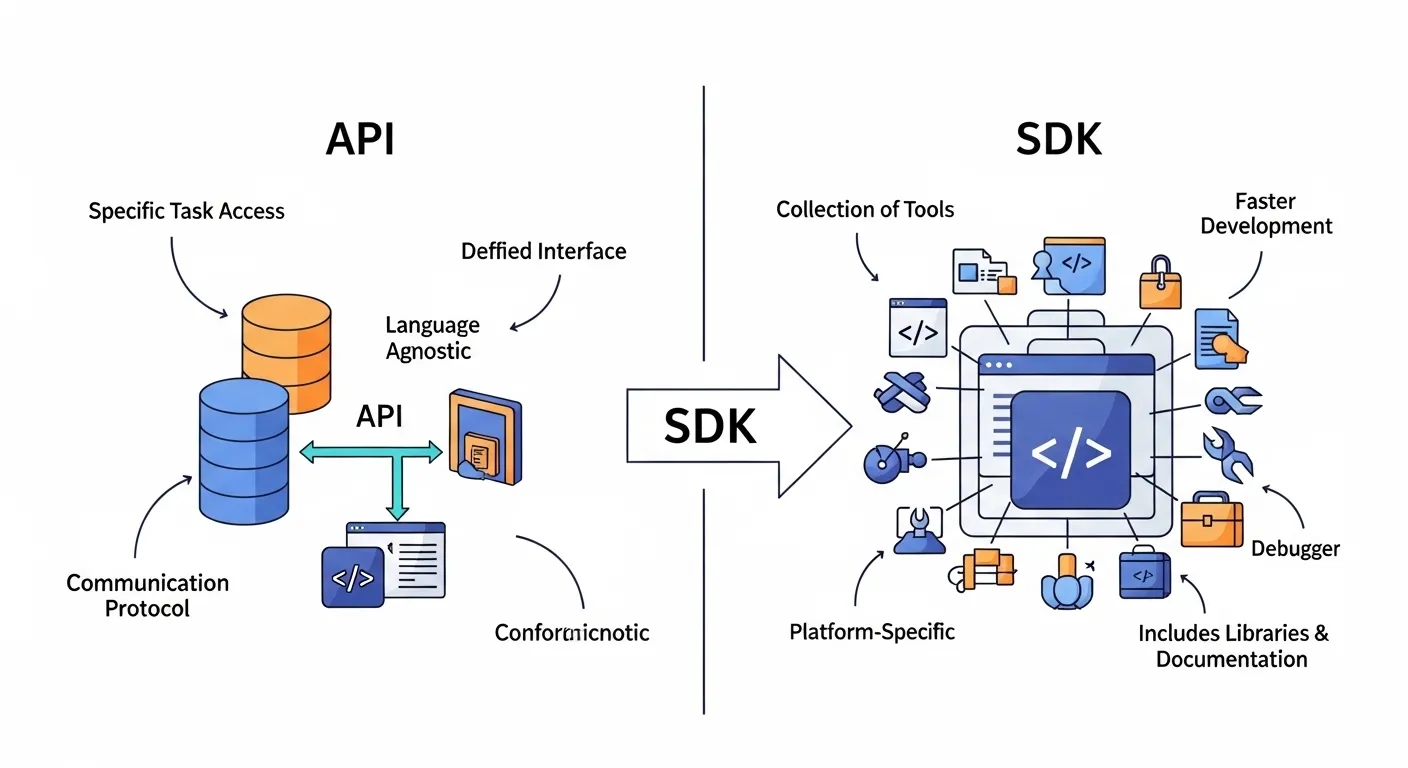
An API (Application Programming Interface) is a set of rules that allows two software applications to talk to each other.
Meaning of API
Think of an API like a waiter in a restaurant. You (the user) give your order to the waiter (API), and the waiter brings food from the kitchen (server). You don’t need to know how the kitchen works.
Key Features of API
- Allows communication between systems
- Uses requests and responses
- Works over the internet (often via HTTP)
- Lightweight and fast
- Platform-independent
Example of API
- A weather app uses a weather API to show the temperature
- Payment systems use APIs to process transactions
- Social media login (like “Login with Google”) uses APIs
What is SDK?
Simple Definition
An SDK (Software Development Kit) is a collection of tools, libraries, and documentation that developers use to build applications.
Meaning of SDK
Think of an SDK like a toolbox. It contains everything you need to build something—from instructions to tools.
Key Features of SDK
- Includes APIs, libraries, and code samples
- Helps build apps faster
- Provides debugging tools
- Platform-specific (like Android or iOS)
- Often includes documentation and guides
Example of SDK
- Android SDK for building Android apps
- iOS SDK for Apple apps
- Game development SDKs like Unity
Key Differences Between API and SDK
Understanding the difference between API and SDK becomes easier with clear points:
1. Purpose
- API: Used to connect systems
- SDK: Used to build applications
2. Functionality
- API: Provides specific functions
- SDK: Provides a complete development environment
3. Components
- API: Only includes communication rules
- SDK: Includes APIs, tools, libraries, and docs
4. Usage Level
- API: Used during runtime
- SDK: Used during development
5. Complexity
- API: Simple to use
- SDK: More complex but powerful
6. Dependency
- API: Works independently
- SDK: Often contains APIs
7. Real-World Analogy
- API = Bridge
- SDK = Full construction kit
Similarities Between API and SDK
Even though they are different, APIs and SDKs share some similarities:
- Both are used in software development
- Both help developers save time
- Both improve efficiency
- Both can be used together
- Both require documentation
These similarities often confuse the API and SDK difference discussion.
Pros and Cons
API Pros
- Easy to use
- Lightweight
- Faster integration
- Flexible
API Cons
- Limited functionality
- Depends on external services
- Security risks if not managed well
SDK Pros
- Complete toolkit
- Faster development
- Built-in tools and support
- Reduces coding effort
SDK Cons
- Large in size
- Platform-dependent
- The learning curve can be high
When to Use API vs SDK
Choosing between API vs SDK depends on your needs:
Use API When:
- You need to connect two systems
- You want quick integration
- You only need specific features
- You are working with web services
Use SDK When:
- You are building a full application
- You need multiple tools and libraries
- You want faster development
- You need platform-specific support
Common Mistakes
Here are some common mistakes people make when comparing API and SDK:
- Thinking they are the same. They are related but not identical
- Ignoring SDK components, the SDK includes APIs plus more tools
- Using SDK when the API is enough. This can make your app heavy
- Not checking documentation. Both require a proper understanding
- Confusing usage stage API = runtime, SDK = development stage
FAQs
1. What is the main difference between API and SDK?
The main difference is that an API allows communication between systems, while an SDK provides tools to build applications.
2. Can an SDK exist without an API?
Usually, SDKs include APIs. So, most SDKs depend on APIs to function.
3. Is API part of SDK?
Yes, APIs are often included inside SDKs as one of their components.
4. Which is easier to use: API or SDK?
APIs are generally easier because they are simpler. SDKs are more complex but powerful.
5. Do I need both API and SDK?
Sometimes yes. You may use an SDK to build an app and APIs to connect it to other services.
6. Is REST API an SDK?
No, a REST API is a type of API, not an SDK.
7. Are SDKs platform-specific?
Yes, most SDKs are designed for specific platforms like Android or iOS.
Conclusion
Understanding the difference between API and SDK is essential for developers, bloggers, and tech learners. In simple terms, an API is a bridge that connects software systems, while an SDK is a full toolkit used to build applications.
If you only need communication between systems, go with an API. But if you want to build a complete application, an SDK is the better choice.
By learning the API vs SDK comparison, you can make smarter decisions, improve development speed, and avoid common mistakes.